Do you need a new LESCO connection, or want to know how to apply for one? Or are you looking for the procedure to change your current connection name, load, or tariff? Here you will find complete guidance, including details about the Demand Notice and applicable fees.
Don’t worry — we’ve got a complete solution for all your needs. We are here to guide you with all the available information in a simple way.
In this article, we will take you step by step through the complete process of getting a new LESCO connection. You can also visit the “LESCO Bill Check” page to instantly view and download your duplicate bill online.
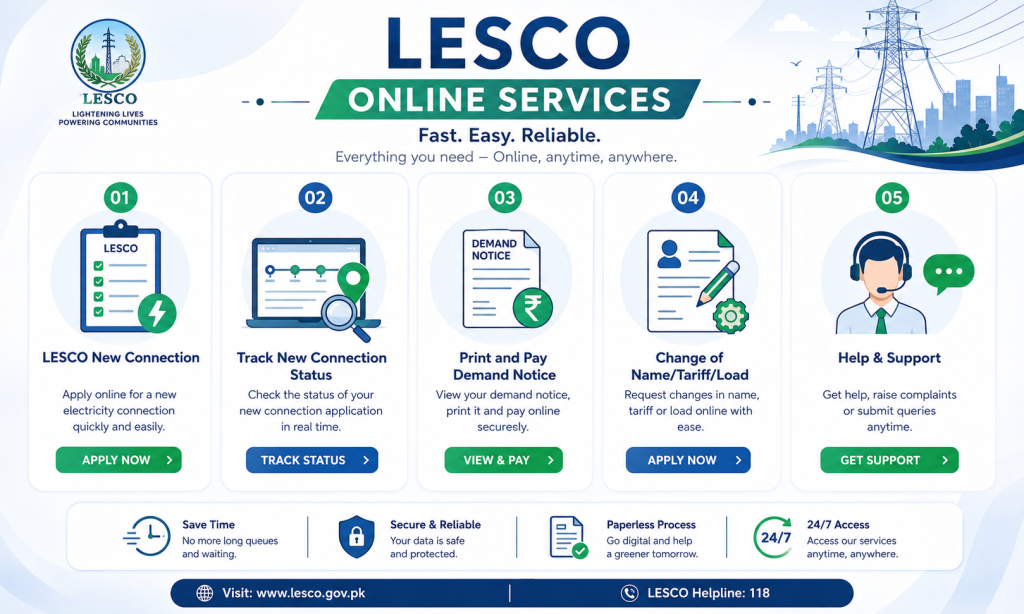
We will also guide you on how to update your existing connection, including changing the connection name, load, and tariff. You will get complete step-by-step instructions for each procedure to make the process simple and easy to follow.
Table of Contents
Click to open / closeHow to Apply for a New LESCO Connection Online
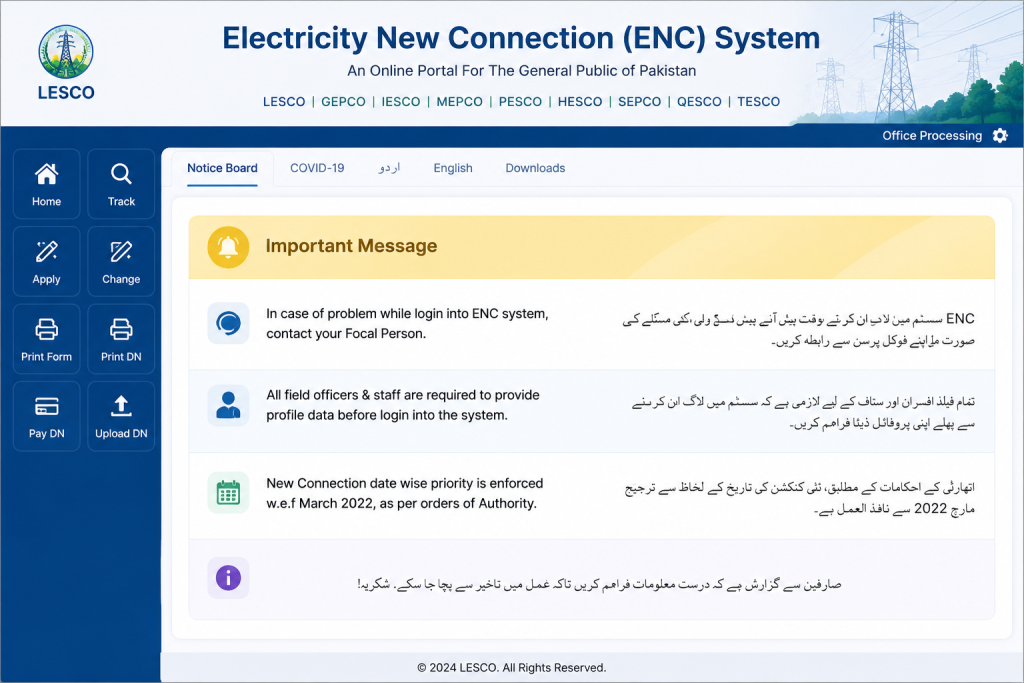
The Government of Pakistan has introduced a centralized Electricity New Connection (ENC) portal, allowing consumers across the country to apply for a new electricity connection, request a name change, load modification, or tariff change online without visiting a LESCO office.
Follow these simple steps to submit your application:
- Visit the official ENC website.
- Click on the “Apply” option from the left-side menu.
- A new application page will open.
- Select the following details:
- Company: LESCO
- Subdivision: Choose your area’s subdivision from the dropdown list.
- Category: Select the category that matches your requirement.
- Reference Number: Enter the reference number of a nearby electricity connection.
- After entering these details, the complete application form will appear.
- Choose the required connection type, such as Domestic, Commercial, Industrial, or Agricultural.
- Enter your personal information, including ownership status, full name, father’s name, nationality, CNIC number, mobile number, and address.
- Provide your contact details. You can also use the same information entered above if applicable.
- Enter the premises information, including the number of existing meters (if any), required load, and the address where the new meter will be installed.
- If you have a solar system and want to export surplus electricity to the national grid, you can also apply for Green Metering (Net Metering) through the same portal.
Once you open the ENC portal, you will see a user-friendly interface that guides you through each step of the application process.
Documents Required for a New LESCO Connection
During the online application process, you must upload the required documents through the ENC portal. Make sure all files are clear, readable, and each file is less than 300 KB in size.
The following documents are generally required:
- A copy of the property ownership document, such as the Registry, Fard, or Property File.
- An attested copy of the applicant’s CNIC.
- An attested copy of the witness’s CNIC.
- A copy of a neighbor’s electricity bill.
- A Wiring Test Report issued by an authorized electrical contractor.
- The Applicant Undertaking, where you agree to the terms and conditions by selecting the “I Agree” option.
After uploading all the required documents and completing the application form, review your information carefully and click Submit.
Once your application is successfully submitted, the system will generate a Tracking ID. Save this ID securely, as it is required to track your application status and access future updates related to your new electricity connection. You can also use the LESCO Bill Calculator to estimate your future electricity bill before receiving your first official bill.
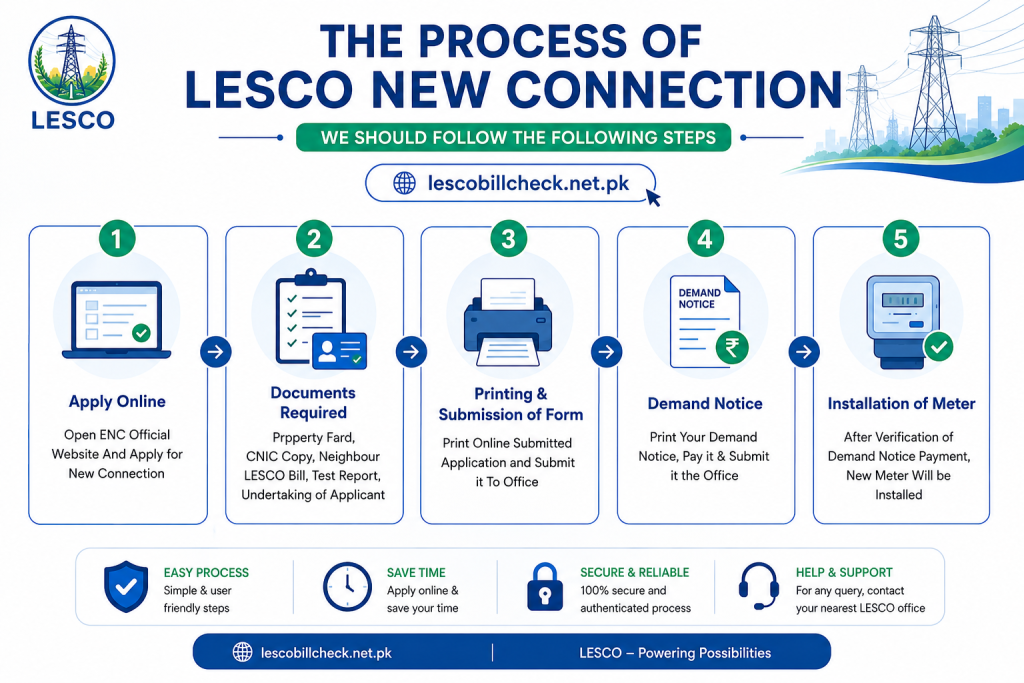
Printing and Submission of Application
After completing the online application, download and print a copy of the submitted form for your records. Once your application is received, the concerned LESCO/WAPDA officials will review the submitted information and uploaded documents.
As part of the verification process, they may visit your premises to confirm your address, property details, and other required information before processing your application further.
Demand Notice ( DN )
Once your application has been verified, you can download and print your Demand Notice (DN) online.
Follow these simple steps:
Finally, submit the payment proof to the concerned LESCO office to complete the remaining process. to its standard procedures.
Visit the official ENC website.
Click on the “Print DN” option.
Enter your Tracking ID to access your Demand Notice.
Download and print the DN.
Pay the required amount at any authorized bank branch or designated payment center.
After making the payment, upload the paid Demand Notice receipt to the ENC portal, if required.
New Connection Application Tracking
Want to check the status of your LESCO new connection application? You can easily monitor your application online using the Tracking ID provided by the ENC (Electricity New Connection) system after you submit your application.
Follow these steps to track your application:
- Visit the official ENC website.
- Click on the “Track” option from the left-side menu.
- Select the appropriate Application Type (New Connection).
- Choose LESCO from the list of electricity distribution companies.
- Enter the Tracking ID you received after submitting your application.
- Click the “Submit” button.
The system will instantly display the current status of your LESCO new connection application, allowing you to track its progress anytime without visiting a LESCO office.
Installation of Meter
After your paid Demand Notice (DN) is verified by LESCO, your new electricity connection will be approved. Once the approval process is complete, a new electricity meter will be installed at the address specified in your application.
Time Required for New Connection Category-Wise
LESCO New Connection Categories
LESCO classifies new electricity connections into three categories based on the required electrical load. The application process and installation timeline may vary depending on the selected load category.
Category 1
Load: Up to 15 kW
Category 2
Load: 16 kW to 70 kW (400 Volts)
Category 3
Load: 71 kW to 500 kW (400 Volts)
Below, you will find detailed information about the application procedure, approval process, and estimated installation time for each LESCO connection category.
Time Frame Required For Category-1 ( load 1kW-15kW )
Consumers applying for a new LESCO connection with a load of up to 15 kW fall under Category 1. Applications in this category are processed by the concerned SDO/Assistant Manager (Operations). Under normal circumstances, the complete process takes approximately 30 days, subject to document verification and the availability of required materials.
Category 1 Processing Timeline
| Process | Estimated Time |
|---|---|
| Application submission, receipt issuance, and seniority number allocation | 1 Day |
| Site inspection to assess the feasibility of the new connection | 3 Days |
| Preparation of the connection cost estimate | 2 Days |
| Issuance of the Demand Notice (DN) to the applicant | 2 Days |
| Submission of the paid Demand Notice receipt | 2 Days |
| Submission and verification of the wiring test report | 3 Days |
| Preparation of the priority list based on the Demand Notice payment date | 1 Day |
| Issuance of the service connection order | 3 Days |
| Request to the store for the required installation materials | 3 Days |
| Supply of equipment by the store | 5 Days |
| Installation of the new electricity connection and meter | 5 Days |
Estimated Total Processing Time: 30 Days
Note: The actual processing time may vary depending on document verification, site conditions, material availability, and LESCO’s operational workload.
Time Frame Required for Category-2 ( Load 16kW-70kW )
Category 2 (16 kW to 70 kW) – Processing Procedure & Timeline
Category 2 includes consumers requiring an electricity load between 16 kW and 70 kW (400 Volts). Applications under this category are approved by the concerned DM/XEN (Deputy Manager/Executive Engineer). Under normal conditions, the complete connection process takes approximately 53 days.
The application procedure is similar to Category 1, but additional technical verification and equipment arrangements may increase the processing time.
Category 2 Processing Timeline
| Process | Estimated Time |
|---|---|
| Application submission, receipt issuance, and seniority number allocation | 1 Day |
| Site inspection and technical feasibility assessment | 4 Days |
| Preparation of the connection cost estimate | 3 Days |
| Issuance of the Demand Notice (DN) | 4 Days |
| Submission of the paid Demand Notice receipt | 2 Days |
| Submission and verification of the wiring test report | 5 Days |
| Preparation of the priority list based on the Demand Notice payment date | 2 Days |
| Issuance of the service connection order | 4 Days |
| Request for required equipment from the store | 15 Days |
| Supply of equipment by the store | 7 Days |
| Installation of the new electricity connection and meter | 6 Days |
Estimated Total Processing Time: 53 Days
Note: The actual processing time may vary depending on document verification, technical inspections, material availability, and LESCO’s operational workload.
Time Frame Required for Category-3 ( Load 71kW-500kW )
Category 3 covers consumers requiring an electricity load between 71 kW and 500 kW (400 Volts). Applications in this category are approved by the Operations Manager. Due to the higher load requirements and additional technical procedures, the estimated processing time is approximately 73 days.
Category 3 Processing Timeline
| Process | Estimated Time |
|---|---|
| Application submission, receipt issuance, and seniority number allocation | 1 Day |
| Site inspection and technical feasibility assessment | 4 Days |
| Preparation of the connection cost estimate | 2 Days |
| Approval for connection installation by the concerned office | 4 Days |
| Submission of the paid Demand Notice (DN) receipt | 4 Days |
| Submission and verification of the wiring test report | 4 Days |
| Issuance of the service connection order | 2 Days |
| Request for the required installation materials from the store | 15 Days |
| Installation process after material availability and committee approval (DMO, AMO & MT Office) | 37 Days |
Estimated Total Processing Time: 73 Days
Note: The processing time is an estimated duration and may vary depending on technical inspections, document verification, material availability, and operational requirements of LESCO
How to Change LESCO Connection Name, Load, or Tariff
There are several situations where you may need to update your LESCO electricity connection, such as transferring ownership after buying or selling a property, changing the connection from parents to children, increasing or decreasing the sanctioned load, or switching to a different tariff category.
In this guide, we explain the complete process for requesting a connection name transfer, load modification, or tariff change, along with the required documents, application procedure, and approval process to help you complete your request smoothly.
How to Apply for a LESCO Name, Load, or Tariff Change
If you want to update your LESCO connection name, sanctioned load, or tariff category, you can submit your request online through the ENC (Electricity New Connection) portal.
Step 1: Submit Your Application
- Visit the official ENC website.
- Click on the “Change” option from the left-side menu.
- Select the required application type:
- Change of Name
- Change of Load
- Change of Tariff
- You may also select multiple options if required.
- Enter the applicant’s details, including:
- Reference Number
- CNIC Number
- Mobile Number
- Applicant Name
- Complete the relevant section based on your request:
- Name Change: Enter both the existing and new owner’s details.
- Load Change: Provide the required sanctioned load.
- Tariff Change: Select the appropriate tariff category and complete the required information.
Step 2: Upload Required Documents
Upload clear copies of the following documents. Each file should be 300 KB or smaller.
- Attested copy of the applicant’s CNIC
- Copy of the latest electricity bill
- Proof of property ownership
Step 3: Submit and Print the Application
After reviewing your information, submit the application through the ENC portal. A Tracking ID will be generated—save it for future reference.
To print your application:
- Open the “Print” option in the ENC portal.
- Select LESCO as the company.
- Enter your Tracking ID.
- Download and print the application form.
- Attach the required documents and submit them to the concerned LESCO office, if requested.
Step 4: Print and Pay the Demand Notice (DN)
Once your application is verified, LESCO will issue a Demand Notice (DN).
To complete the process:
- Open the “Print DN” option on the ENC portal.
- Enter your Tracking ID and download the Demand Notice.
- Print the DN and pay the required fee at an authorized bank or payment center.
- You can also pay the Demand Notice online through the “Pay DN” option available on the ENC portal.
- After payment, upload the paid receipt using the “Upload DN” option, if required.
- Submit the payment proof to the concerned LESCO office.
After the payment is successfully verified, your requested name change, load modification, or tariff change will be processed and updated by LESCO.
Conclusion
Applying for a new LESCO electricity connection or requesting a name, load, or tariff change is now simple and convenient through the official ENC portal. By following the step-by-step process outlined above, you can submit your application online, upload the required documents, pay the Demand Notice, and complete the entire procedure with ease.
After submitting your application, you can also track its status online at any time by entering your Tracking ID on the ENC portal. This allows you to monitor the progress of your request without visiting a LESCO office, making the process faster, more transparent, and user-friendly.